Enhanced Search & Workflow Optimization
Launched Enhanced Search across four core workflows with advanced filters and bulk-add, driving a +166% increase in items added and a 67.8% bulk-add completion rate among early adopters.
The Problem
Sortly serves over 17,000 customers and more than one million users globally, primarily in the SMB segment with a growing Enterprise base. Our customers span industries like plumbing, HVAC, medical, construction, and asset tracking. These businesses often operate across multiple locations, and in many cases share the same items across those locations. For someone setting up Sortly for the first time, this multi-location structure creates a challenge that compounds inside our core workflows.
Sortly has four primary workflows that power how our customers operate: Stock Counts, Pick Lists, Invoices, and Purchase Orders. Each of these requires users to search for and select items from their inventory. The problem was that our existing search component, built on Elasticsearch, was limited in the details it could surface.
I identified a critical friction point: when a user searched for an item like "power drill," they'd see it appear multiple times across different locations, but without enough context to know which one to select. Users moved fast through these workflows, and would often realize too late that they'd selected the right item in the wrong location. This led to unnecessary delays, workflows having to be restarted, and overall inefficiency that was directly impacting how customers got work done.
Users with large inventories had it worst. While we did show the folder path (Sortly's core structure is built around items and folders), it wasn't visually prominent enough. Users moving quickly through search results would see multiple matches and still add the wrong item. The existing UI simply wasn't doing enough to help users make the right selection.
On top of the search limitations, bulk adding items to a workflow had never been supported. Users were forced to click and add items one by one, which was tedious at best and unusable at scale. For a customer with hundreds of items in a single location, building out a Stock Count or Pick List meant clicking through results individually. This compounded the frustration and was another key pain point I wanted to solve through this project.
I was hearing this consistently across multiple channels. Power users were submitting requests through our Frill feature request tool. Zendesk tickets were coming in with the same pain point. Our GTM team was flagging it in customer conversations. One customer told us directly that they couldn't use our current workflows given the way search was set up. That was the key signal that told me this needed to be solved.
My Approach
Prioritization. I prioritized this by looking at the key factors driving Sortly's growth: our simple, easy-to-use UI, snappy load times, and our KISS-method workflows. These are the core reasons businesses choose Sortly over competitors and what continues to push our growth. I ran this through our RICE scoring framework and our 5 Ps framework (Problem, Persona, Promise, Proof, Product) and it was clear: this was a low-hanging fruit project with massive impact potential.
Discovery. From my customer experience background and prior customer interviews, I already knew this was a significant pain point. But I needed the full picture. I pulled up our feature adoption dashboard in Looker to dig into the data: users who were aware vs. activated, how they were adding items to workflows, and where drop-off was happening. I talked to the front lines, the CSMs, GTM team, Sales, and CX, to hear what they were hearing directly from customers. I ran in-app surveys, conducted customer discovery calls over Zoom, and studied how competitors were handling search within their own workflows. All of this helped me understand the full scope of the problem before jumping into the PRD.
Scoping the Solution. I used the 5 Ps framework to structure the problem: identifying the Problem, Persona, Promise, Proof, and Product. I took everything from discovery and used AI to synthesize the findings into key trends, sticking points, and what customers truly wanted. From there, I filled out the PRD and presented the engineering team with multiple solution options, not a single predetermined answer. The goal was to work alongside the team to evaluate tradeoffs, explore different approaches, and converge on the best solution together with Design and Engineering.
Cross-Functional Collaboration. I worked closely with the design team and engineering to define the scope. With Design specifically, I made sure we were tackling the details that mattered: the UI/UX refinements, auto-scroll behavior, and bulk-add functionality. These were all critical for a successful launch.
The Non-Negotiable. One thing I knew we had to ship without question: giving users the ability to select which folder (location) they wanted to pull inventory from. This was the core of the problem. Customers were struggling to pull the right items from the right locations, and folder selection solved it. With this change, a user would first choose where to search, and then results would correspond only to that location, making their inventory selection accurate. Previously, there was no folder selection option at all.
Building for Scale. Because the search component was exactly the same across all four workflows, we knew we could deploy a single, shared experience across Stock Counts, Pick Lists, Invoices, and Purchase Orders. This made the project even more impactful: one build, four workflows improved, plus a foundation for any future workflows we want to support. It was critical to get this right the first time, and the results proved we did.
The Solution
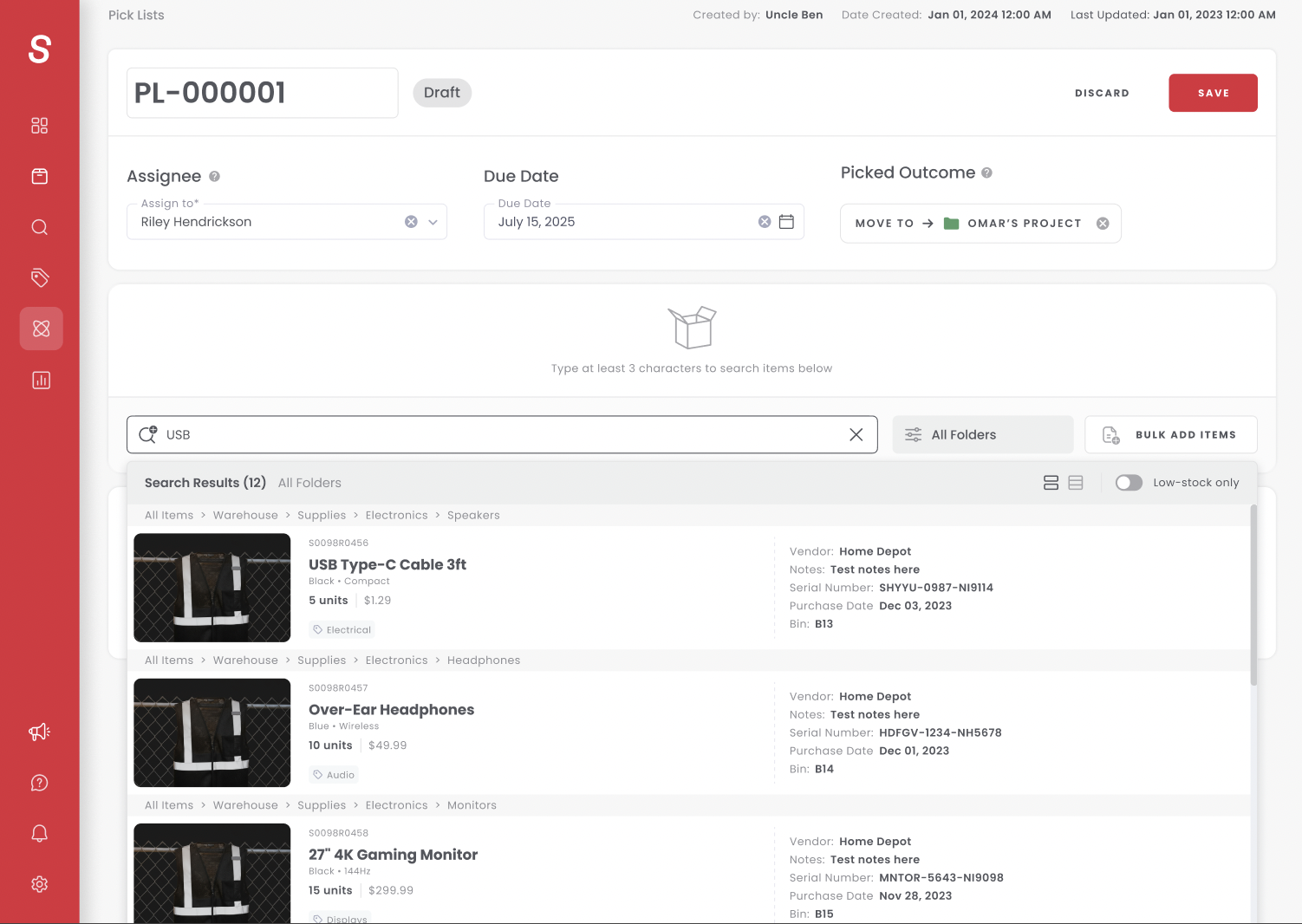
We shipped Enhanced Search as a unified component across all four core workflows: Stock Counts, Pick Lists, Invoices, and Purchase Orders. The design centered on three pillars: folder selection, improved search results, and bulk add. Each addressed a specific pain point while preserving the existing workflow experience our customers already knew and loved.
Folder Selection. This was the foundation of the entire feature. Inside Sortly, inventory is organized in a folder tree: root-level folders with subfolders that provide location context and categorization. A tools folder might contain subfolders for power tools, standard tools, gas tools, and miscellaneous. A warehouse customer might organize by aisles, racks, and bins, each level narrowing down to the physical location of their inventory.
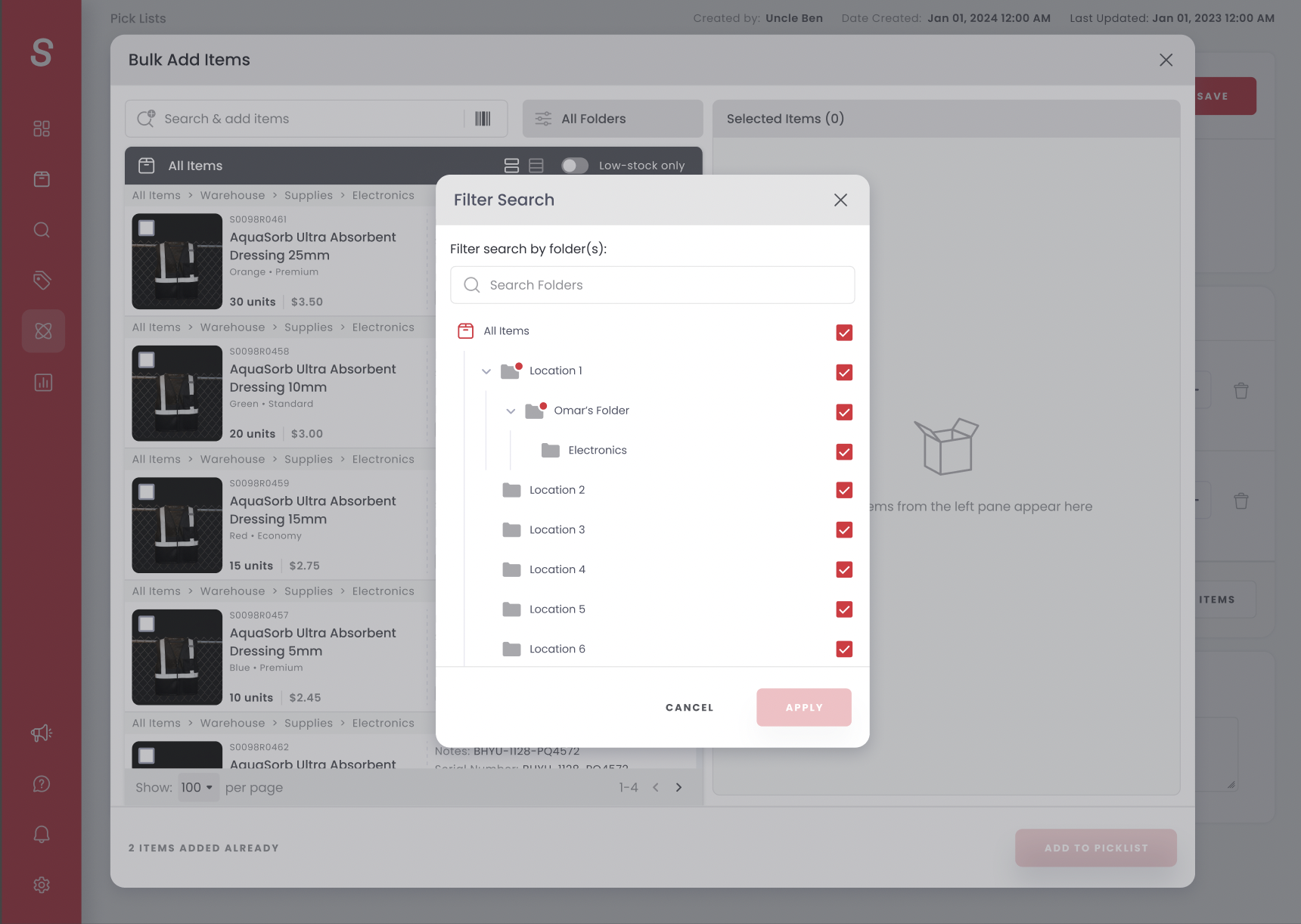
Previously, when a user searched inside a workflow, the results pulled from everything in the system with no folder selection option. If a user had the same item in a San Diego warehouse and an LA warehouse, there was nothing stopping an LA employee from accidentally selecting the San Diego item, throwing off inventory accuracy for both locations.
We gave users the ability to select which folder they wanted to pull inventory from before searching. This meant they could narrow results to a specific location, category, or group of folders. Results now corresponded to that selection, making every item addition accurate and intentional. We also pushed to support multiple folder selection, which was a key engineering challenge but critical for customers who needed to pull from more than one location at a time.
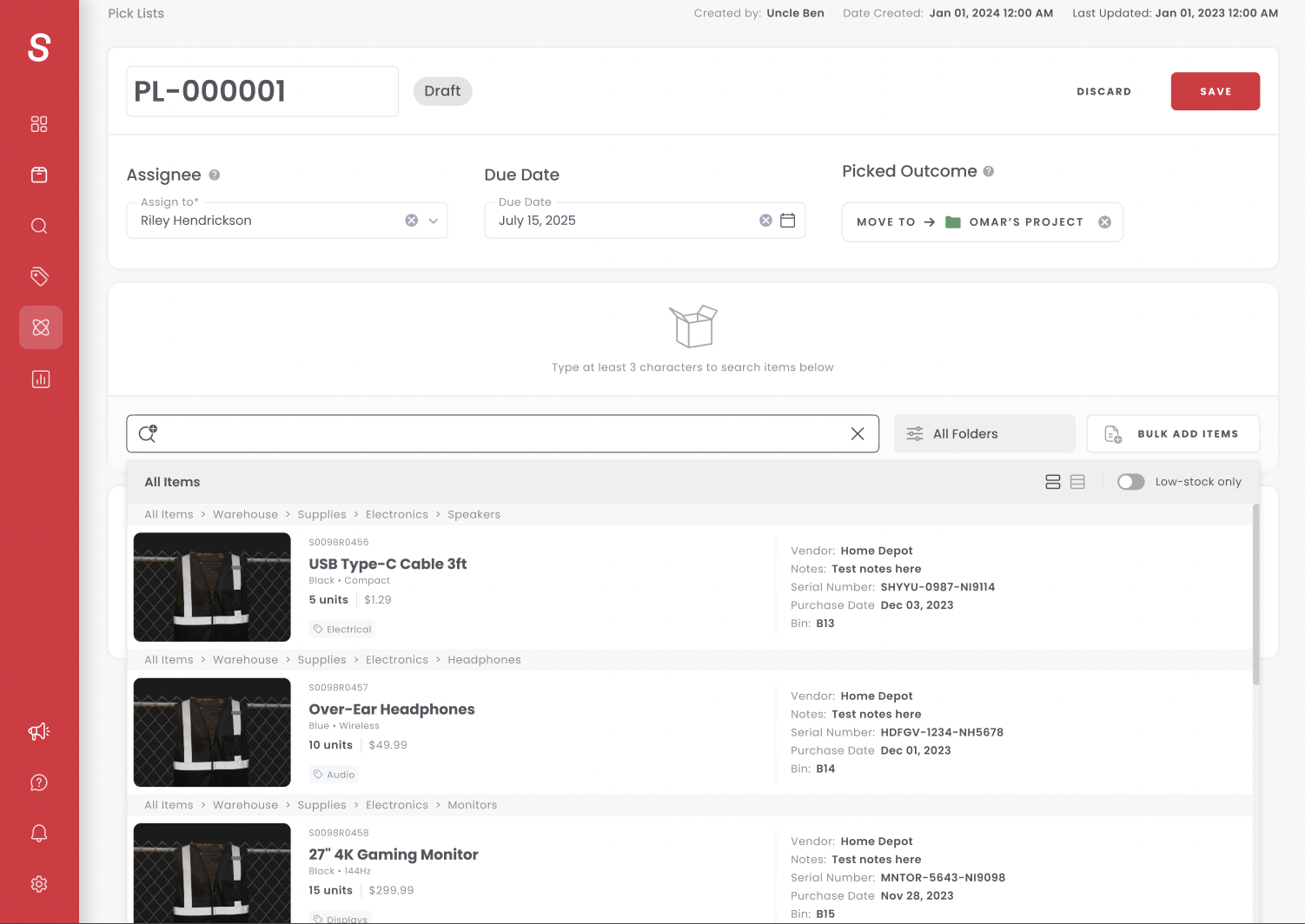
Improved Search Results. Once a user selected their folder, the search results reflected only that inventory. Users could type an item name to filter results, or simply click into the search bar to browse everything in the selected folder. The results now carried the context users needed to make the right selection, rather than showing duplicate items across the entire system with minimal differentiation.
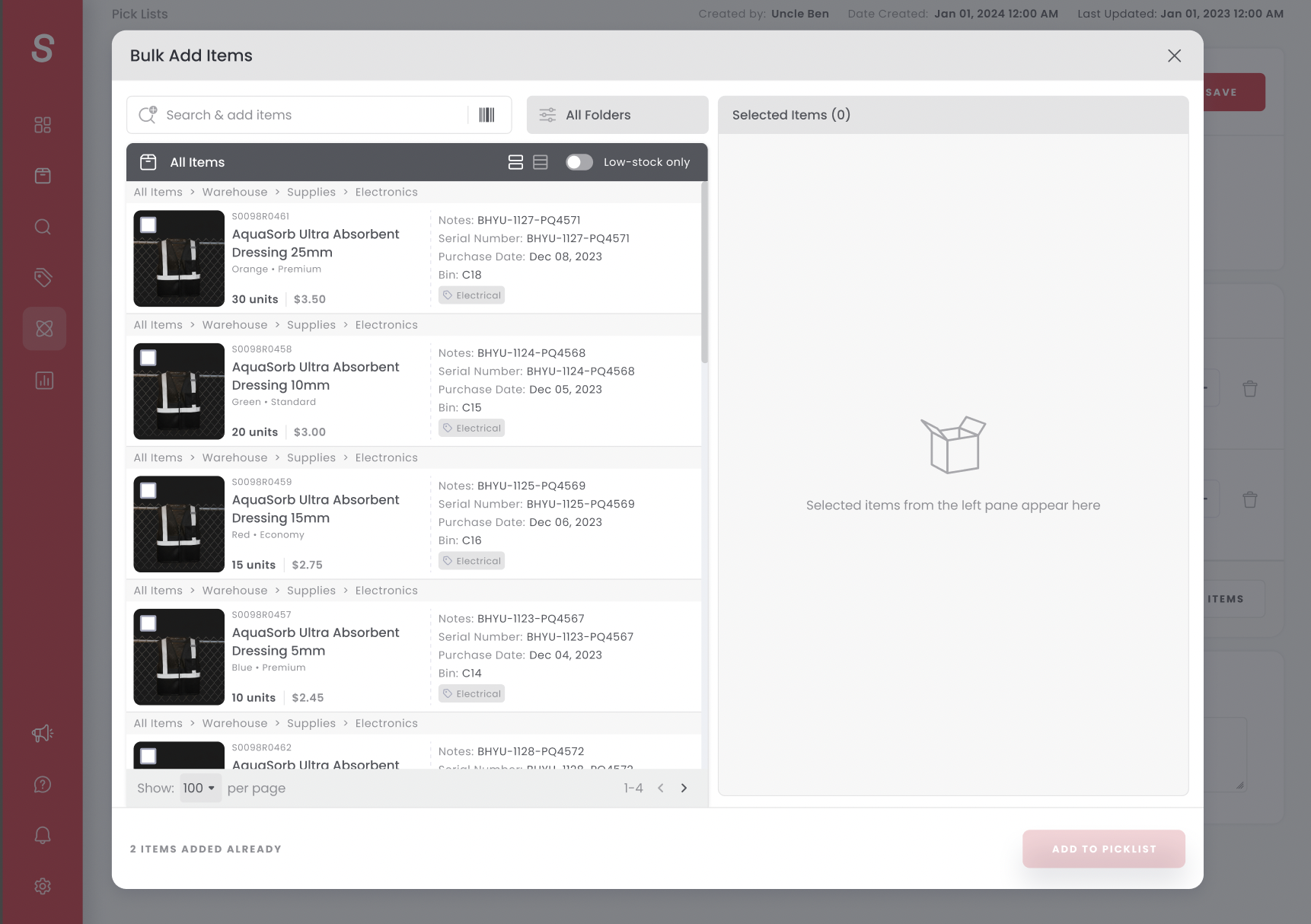
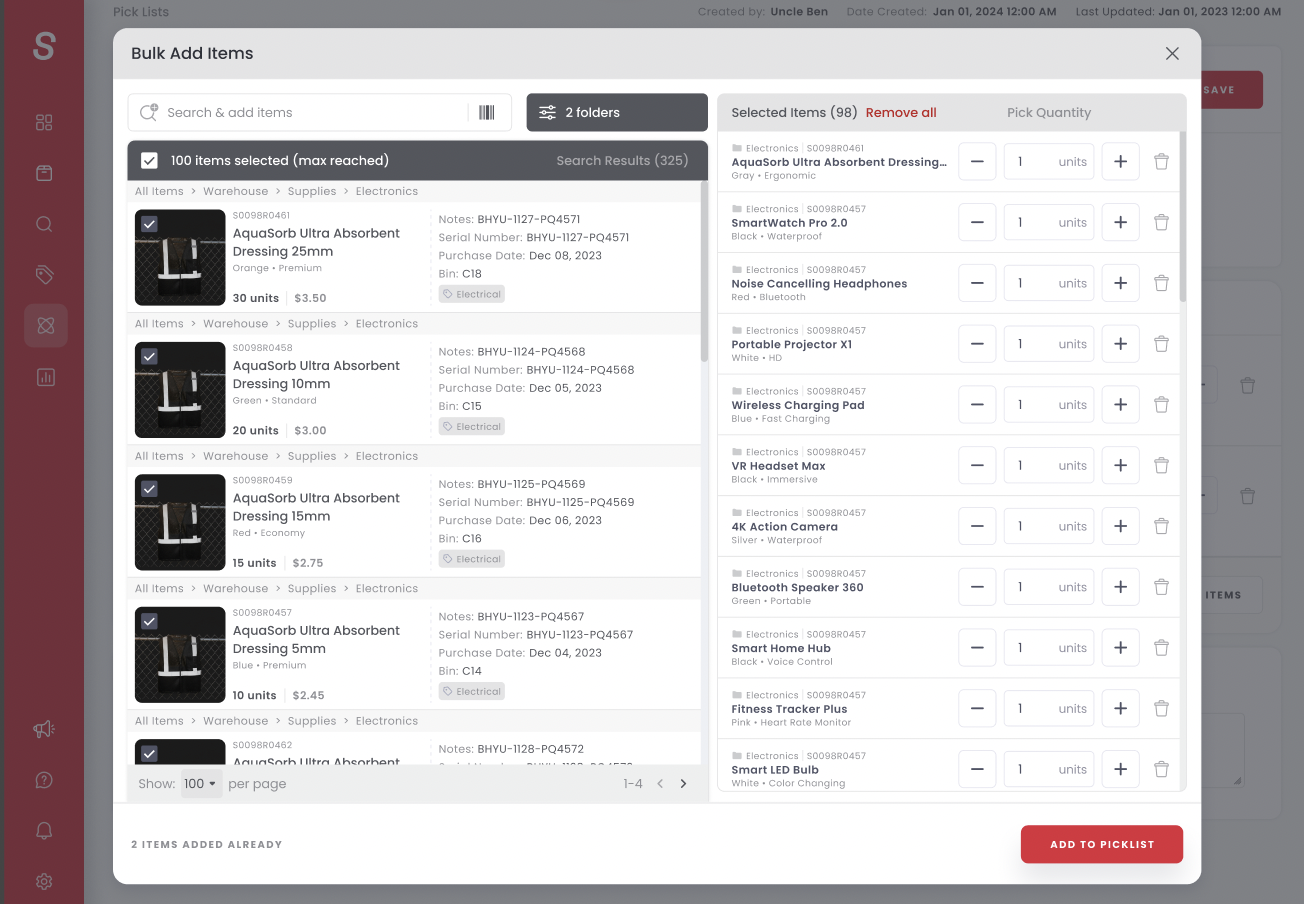
Bulk Add. For years, users had been forced to add items to workflows one by one. With workflows supporting up to 100 items (and 250 for Stock Counts, which we increased given the scale of those projects), clicking through items individually was tedious and error-prone.
We built a bulk add experience modeled after an e-commerce shopping cart. Users click the bulk add button and are presented with a full modal where they can select folders, browse filtered results, and input quantities for each item. Next to every item, a cell shows how many remain available to add. Users can select 10, 75, or any number of items, review their selections like a cart, and add them all to the workflow in one action. They can still modify selections before advancing the workflow to the next status. We retained the legacy one-by-one experience alongside the new bulk add to avoid disrupting existing user habits.
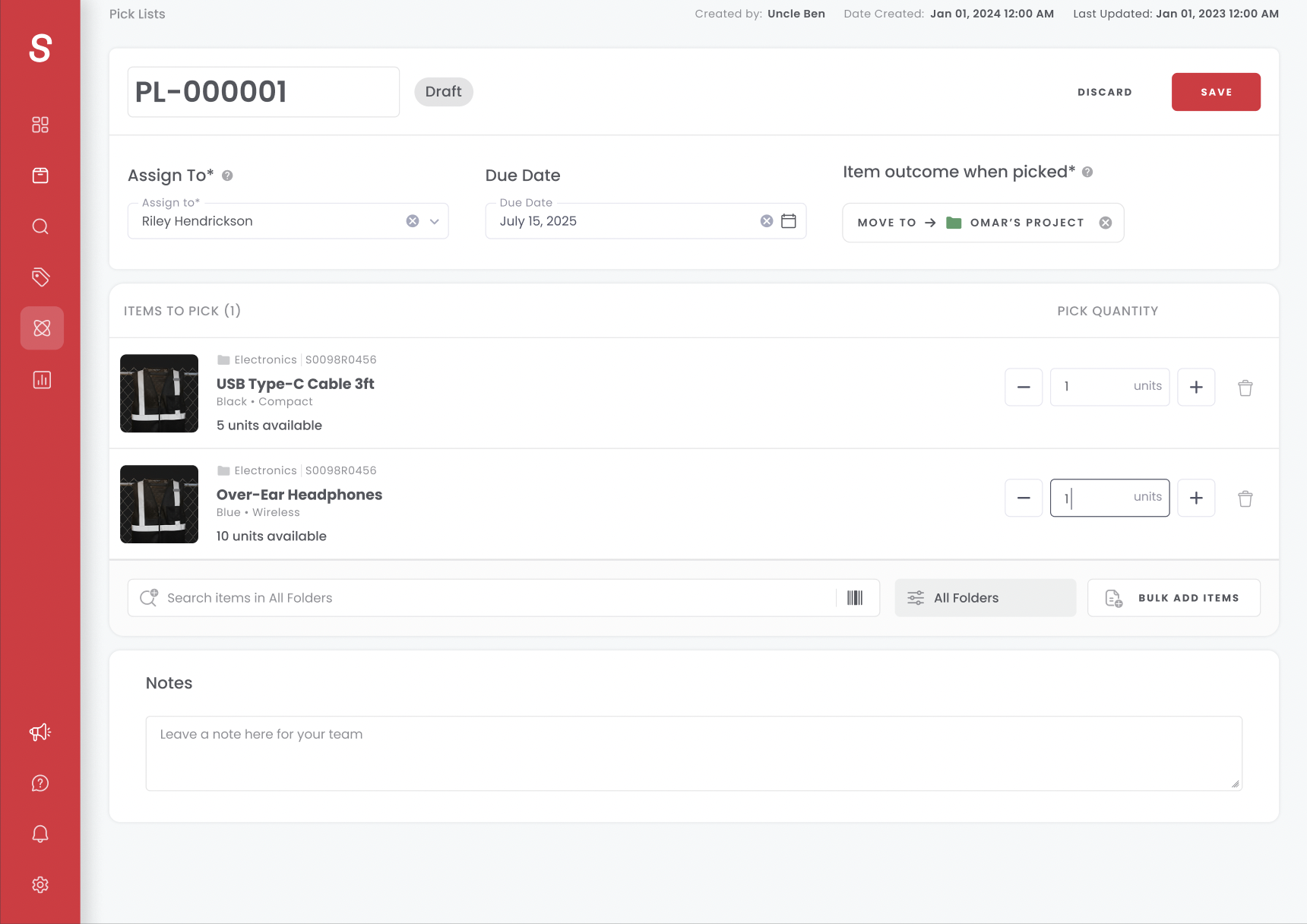
Auto-Scroll. This was a subtle but critical UX fix. Previously, every time a user added an item, the page jumped back to the top. The user would have to scroll down, find their place, search again, and repeat. For a workflow with 50 or 100 items, this was exhausting.
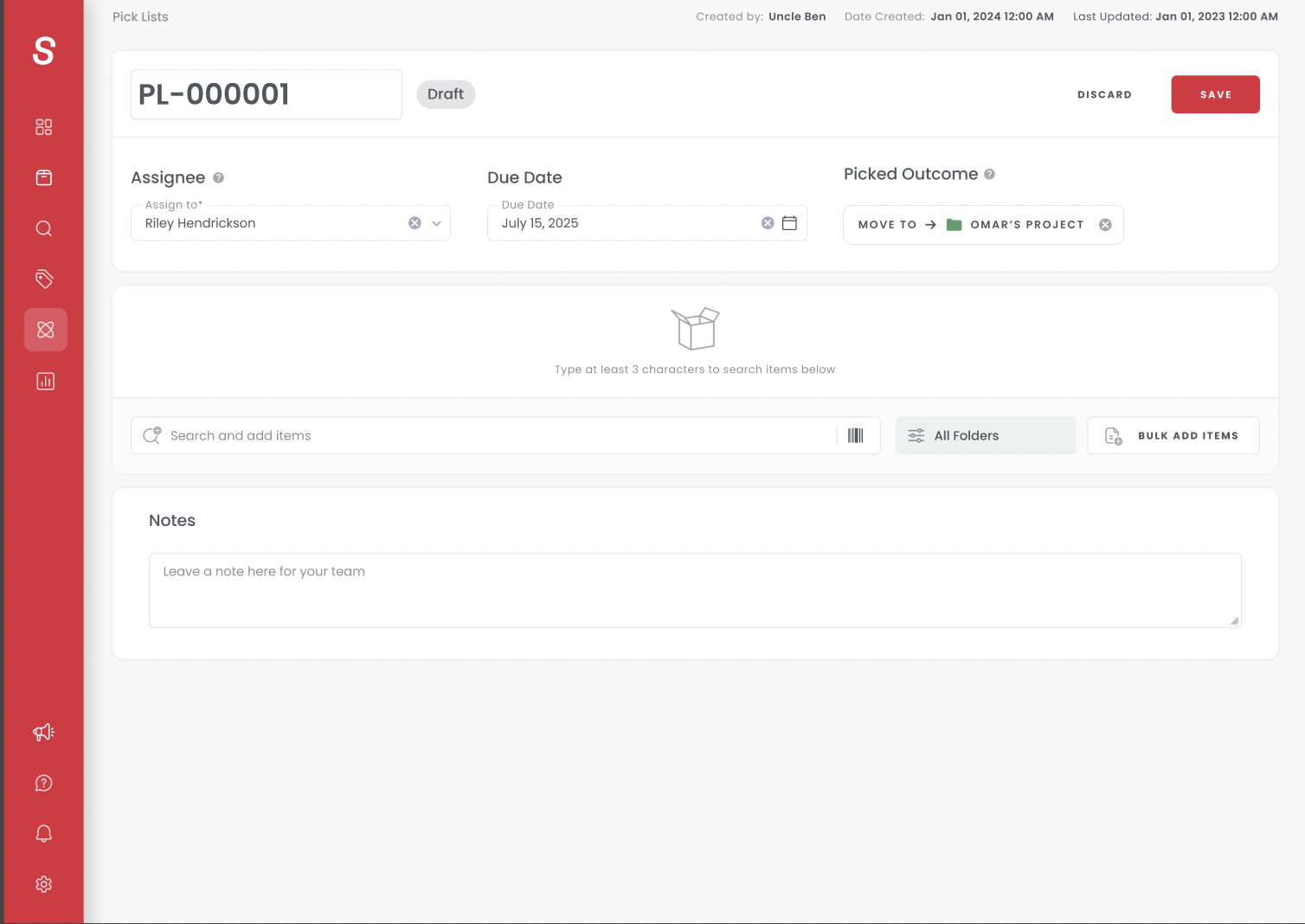
We relocated the search bar to the bottom of the page and placed items toward the top. As items were added, the page auto-scrolled to keep the user in position, letting them stay in their flow and immediately add the next item. These are the small details that customers may not consciously notice, but they transform the experience from frustrating to effortless.
Mobile-First, Web-Second. Mobile had solved this first. Web was just catching up. The search experience had already existed on our mobile app, and we knew it made the workflow better. This was about bringing that same quality to web.
Results
The data told the story immediately. Within the first weeks of launch, Enhanced Search drove measurable impact across every workflow.
Stock Counts saw the most dramatic lift, validating that this workflow was the most bottlenecked by the old search experience:
Users weren't just using Stock Counts more. They were building bigger, more comprehensive counts. The average number of items per Stock Count workflow jumped 42%, from 24 to 34 items, and 67.8% of early adopters completed their bulk-add sessions, confirming that the new modal removed the friction users had been running into for years. Once folder selection and bulk add were in place, users expanded their workflows to match what they actually needed.
Across all four workflows combined:
Every workflow saw improvement. Purchase Order items added grew 9.7%. Pick List adoption increased 15.3% in companies using the feature. Invoice workflow adoption jumped 28% in active companies.
The unlock was clear: by giving users folder selection, better search context, and bulk add, we removed the friction that had been holding back adoption for years. Enhanced Search didn't introduce new functionality to Sortly. It made existing functionality usable at scale, and the numbers proved that the demand was already there, waiting to be unlocked.
Key Learnings
Shared components multiply impact. We went into this project knowing we wanted to solve the search experience across all workflows at once, not fix one and come back to the rest later. By building a single reusable component, we increased engagement, adoption, and awareness across four workflows simultaneously. Every future workflow Sortly builds will inherit this same experience. My advice to PMs working on features that touch multiple areas of a product: don't be afraid to tackle it holistically. A single change deployed in multiple places can hit your KPIs far more efficiently than a one-and-done approach you have to revisit later. Think through it with your team, decide if it makes sense to ship across the board, and go for it.
Good UI/UX is worth fighting for. We got pushback from engineering on auto-scroll because it added complexity. But knowing your user matters more than taking the easier path. I pushed back tactfully: our customers' experience is everything. If the UI or UX isn't great, users will abandon the feature regardless of how powerful it is under the hood. Having a strong designer on the team made this possible. They advocated relentlessly for what made sense for our users. The lesson: when you believe a UX detail will make or break adoption, push for it. Ask about UI and UX in your discovery calls. The details matter more than most PMs think.
Mobile had already solved it. One of the most interesting aspects of this project was realizing that our mobile app had natively solved the folder selection problem years ago. iOS and Android each had their own search components that let users select specific folders, something web had never offered. Without a ton of awareness around it, the mobile team had already addressed one of our biggest customer pain points. When I dug into the web workflows and heard the same feedback from customers, the answer was right in front of us. We took what mobile had proven, adapted it for web using the KISS method, and shipped an experience that addressed every pain point our customers had been raising. Sometimes the best solution already exists in your own product. You just have to look.