Stock Counts: Inventory Reconciliation
Applied JTBD research to discover that users needed to verify inventory accuracy, not just track it. Shipped the platform's first physical-vs-system reconciliation capability.
The Problem
Inside Sortly, your inventory is only as accurate as what you have in the system. And in the real world, accuracy erodes constantly. Items get misplaced. They get left at a job site. They sit in the back of a truck. In some cases, they get stolen. For businesses that rely on Sortly to manage their operations, not trusting the numbers in the system creates a cascade of problems.
Without accurate inventory data, customers face stockouts, overspending, and operational delays. A plumbing company might bid on a job thinking they need to order materials, when in reality they already have enough inventory on hand. A medical supplier might trigger low-stock alerts and rush-order items they don't actually need. A construction team might show up to a site without critical equipment because the system said it was available at a different location.
The industries feeling this the most were the ones dealing with consumable inventory: HVAC, plumbing, electrical, manufacturing, construction, and medical. These businesses use items daily, taking them to job sites, using them on patients, deploying them to projects. If inventory levels don't match what's actually on the shelf, every downstream decision is compromised.
Before Stock Counts, customers had no way to reconcile their physical inventory against what Sortly showed. They were writing on spreadsheets, performing manual counts per item, or exporting CSV files and tracking everything outside the system. There were no real workarounds inside Sortly itself. We had released a beta version called Cycle Counts to about a thousand users earlier in the year, but it was extremely limited: users could only count items one by one, with no ability to perform a full count across multiple items at once.
I discovered the depth of this need through multiple channels. We had three of our four primary workflows in place (Invoices, Purchase Orders, and Pick Lists), but we were missing the counting component, which is a fundamental capability in any inventory management system. Zendesk tickets, our GTM team, Sales, mid-market team, and PMM all flagged this as a gap. I conducted customer interviews with businesses dealing with this daily. The consistent message: "I don't fully trust what's in Sortly." Teams would forget to log items when returning from a job site, or quantities would drift over time with no mechanism to catch the discrepancy.
The business case was straightforward: Sortly should be the source of truth for inventory quantities. If customers can't trust the data, the entire platform loses value. Stock Counts would give them the ability to verify what's actually on the shelf, identify discrepancies, and approve quantity updates to bring Sortly back in line with reality.
My Approach
Scoping Beyond the Beta. The Cycle Counts beta validated demand but was too constrained: one item at a time, no list building, no real workflow structure. That opened the door for Stock Counts.
Discovery & Research. I conducted 15 to 20 discovery calls with a deliberately diverse set of users: power users, newer customers, lower-tier plans, beta participants, and people who never touched the beta. Every interview used open-ended questions. The worst thing a PM can do is have an answer before discovery starts.
I ran a thorough competitive analysis since most competitors in the IMS space already offered counting functionality, and their implementations surfaced gaps we'd missed in the beta. I also leveraged Frill, our feature request tool, where Stock Counts had significant traction and engagement.
Using the JTBD framework, I synthesized everything into clear trends and priorities: what users actually wanted to accomplish, where the beta fell short, and what a production-ready Stock Count workflow needed to look like.
Workflow Design. Our existing workflows (Pick Lists, Invoices, Purchase Orders) gave us the stage-based framework, but several key decisions made Stock Counts unique:
250-item limit. Stock counts operate on a fundamentally different timeline. A Pick List takes a day. A Stock Count can take weeks. We increased the limit from 100 to 250 line items. If you're going to count, count right.
Permissioning and approval flows. Sortly has five user permission levels, and every business handles approval differently. We brought these questions directly into discovery: who creates, who counts, who reviews discrepancies, who approves quantity changes.
Blind counts. We introduced the option to hide expected quantities during counting so numbers aren't influenced by system data. Independent physical counts, no bias.
Status consolidation. We trimmed redundant statuses, cutting the fat where "complete" and "shipped" meant the same thing. Fewer statuses, cleaner experience.
Cross-Platform from Day One. This was the first feature I led that launched simultaneously on web and mobile. Offline mobile sync was the hardest engineering problem. Two devices, one stock count, conflicting data. Getting this wrong meant corrupted inventory. That's why I brought engineering in early: seven engineers and one designer, with front-end, back-end, and mobile teams coordinating from discovery, not just implementation.
Frameworks & Prioritization. RICE scoring confirmed the impact. The 5 Ps framework (Problem, Persona, Promise, Proof, Product) built the executive case. The exec team greenlit it in a single meeting.
Seven sprints. Two months. Discovery to launch on both web and mobile.
The Solution
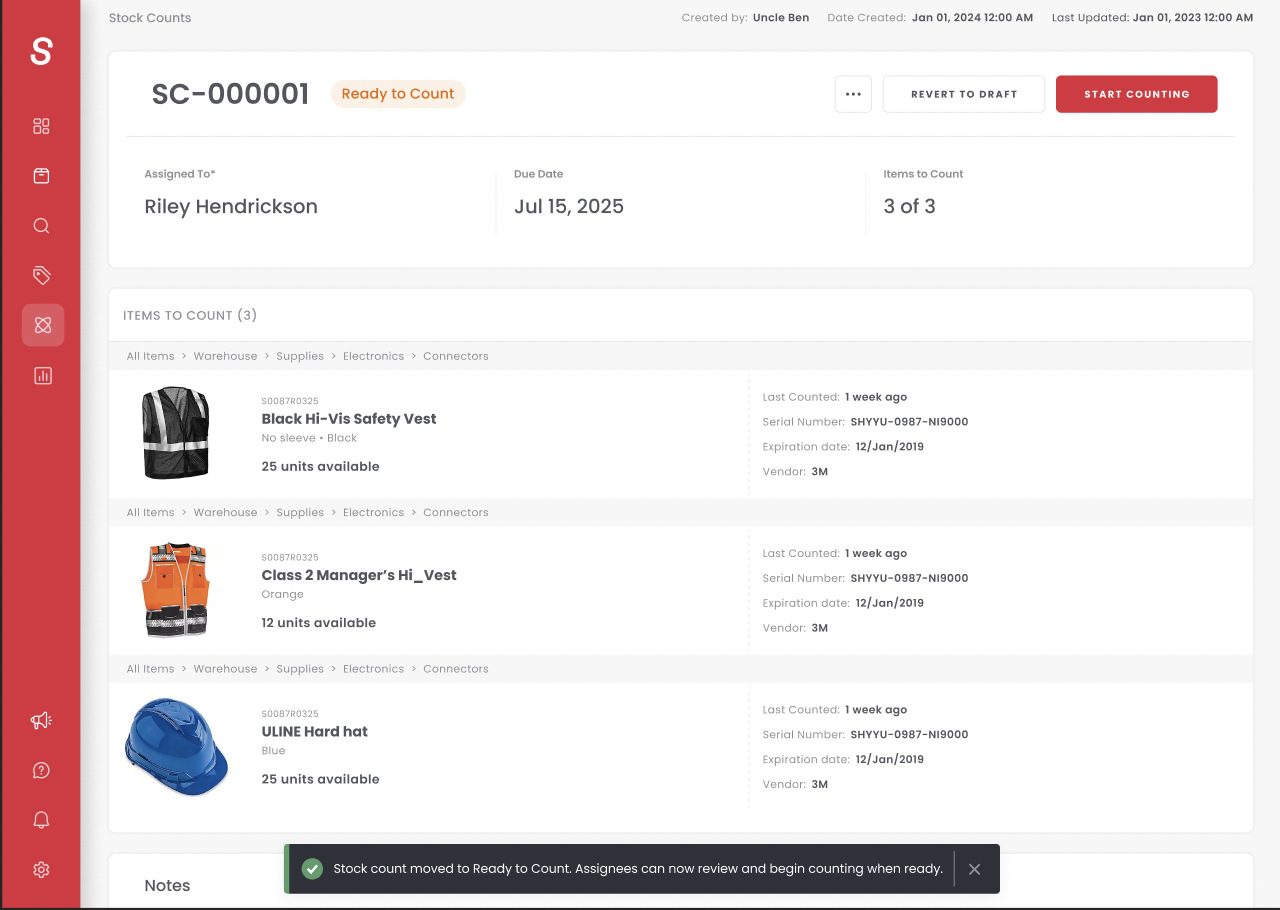
Stock Counts shipped as a full-lifecycle workflow across both web and mobile: create, assign, count, review discrepancies, and approve quantity changes, all from a single system.
The Workflow. A creator builds the stock count in Draft, adds items (up to 250), assigns it to a counter, and moves it to Ready to Count. The counter picks it up, counts every item, and submits for review. A reviewer (Owner or Admin only) resolves discrepancies and completes the count. Email notifications fire at every status change. The count can be voided at any point.
On mobile, counting is physical: scan a barcode, quantity goes up. On web, type it or click plus/minus. Both platforms, same statuses, same data, fully synced.
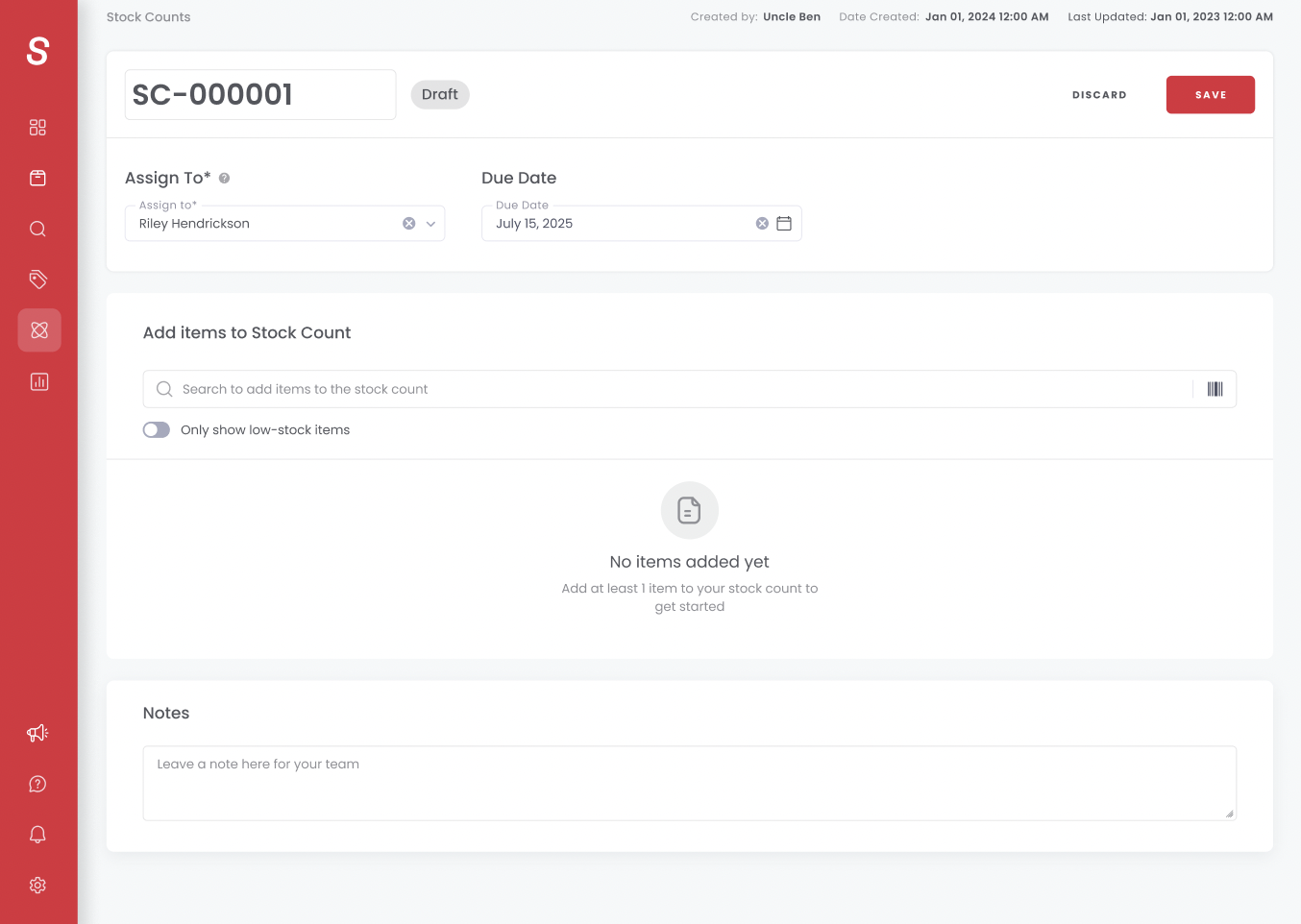
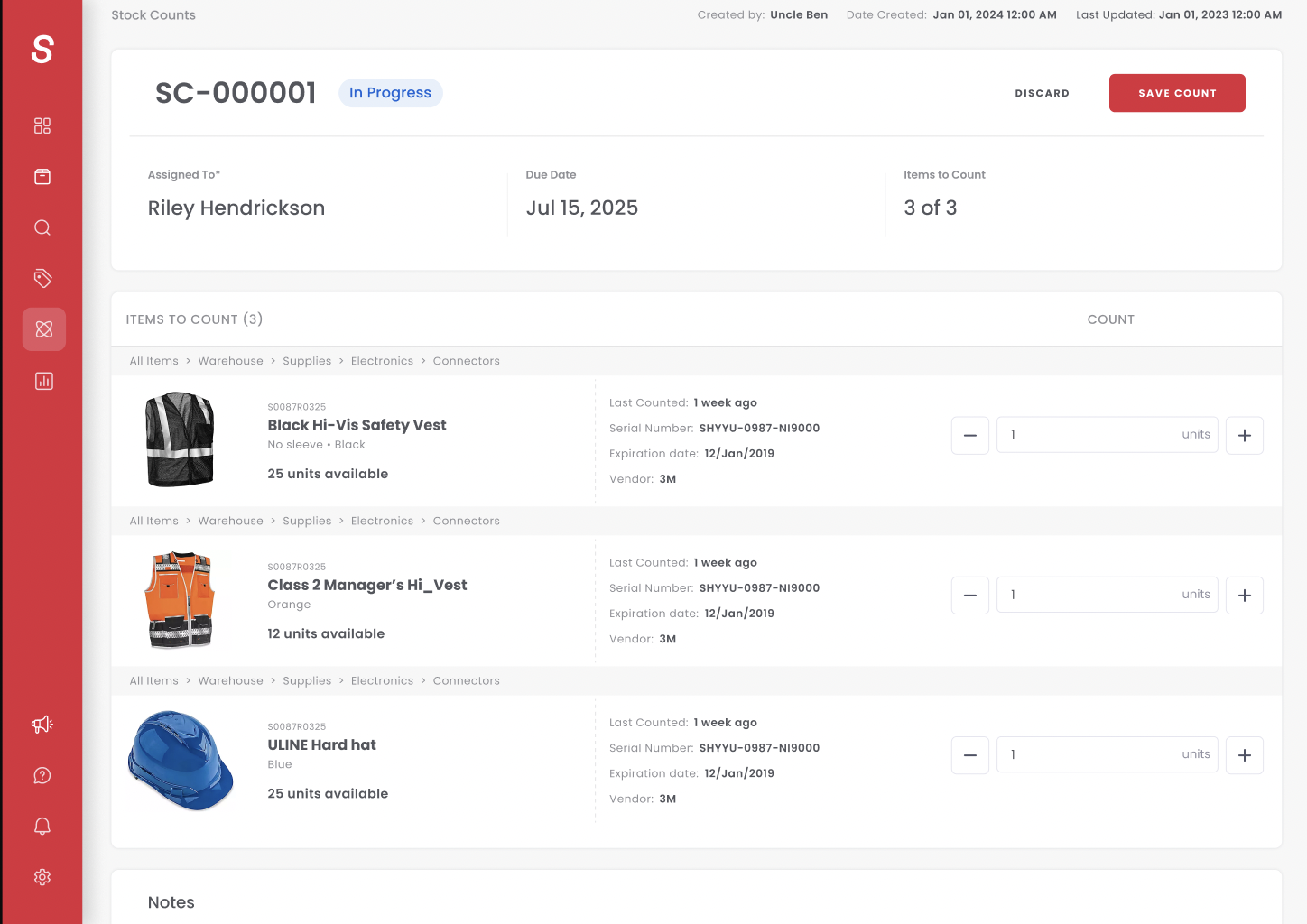
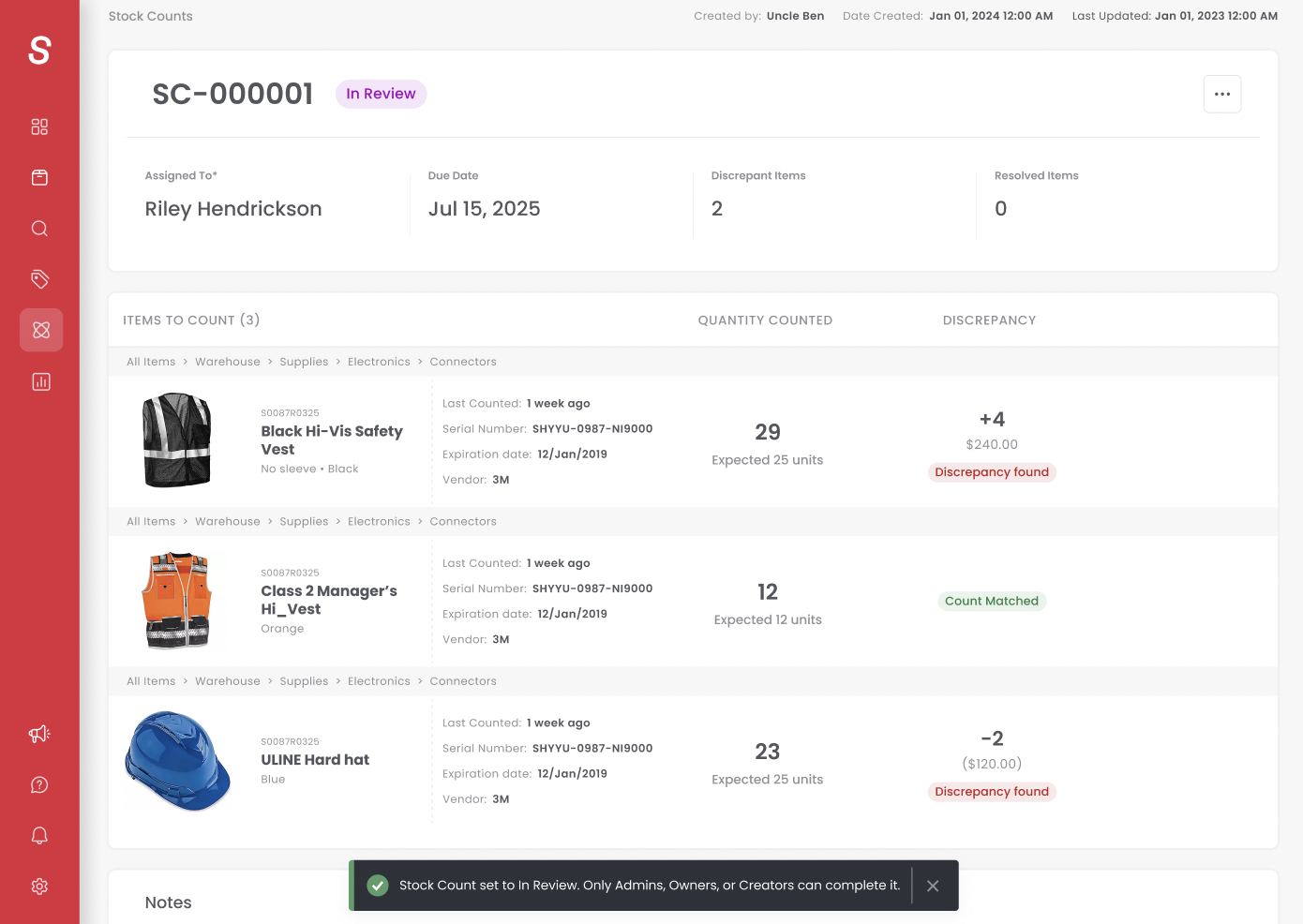
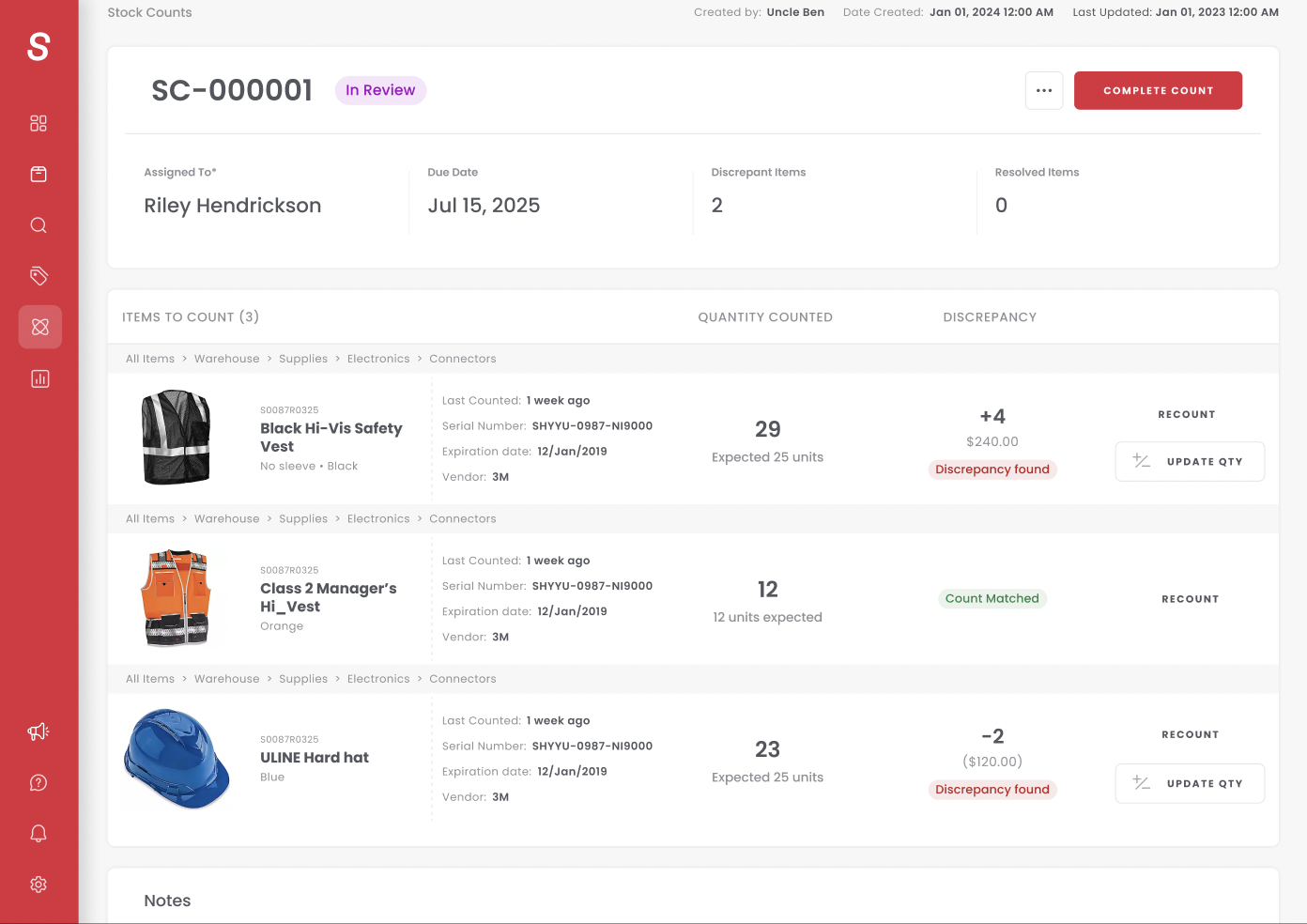
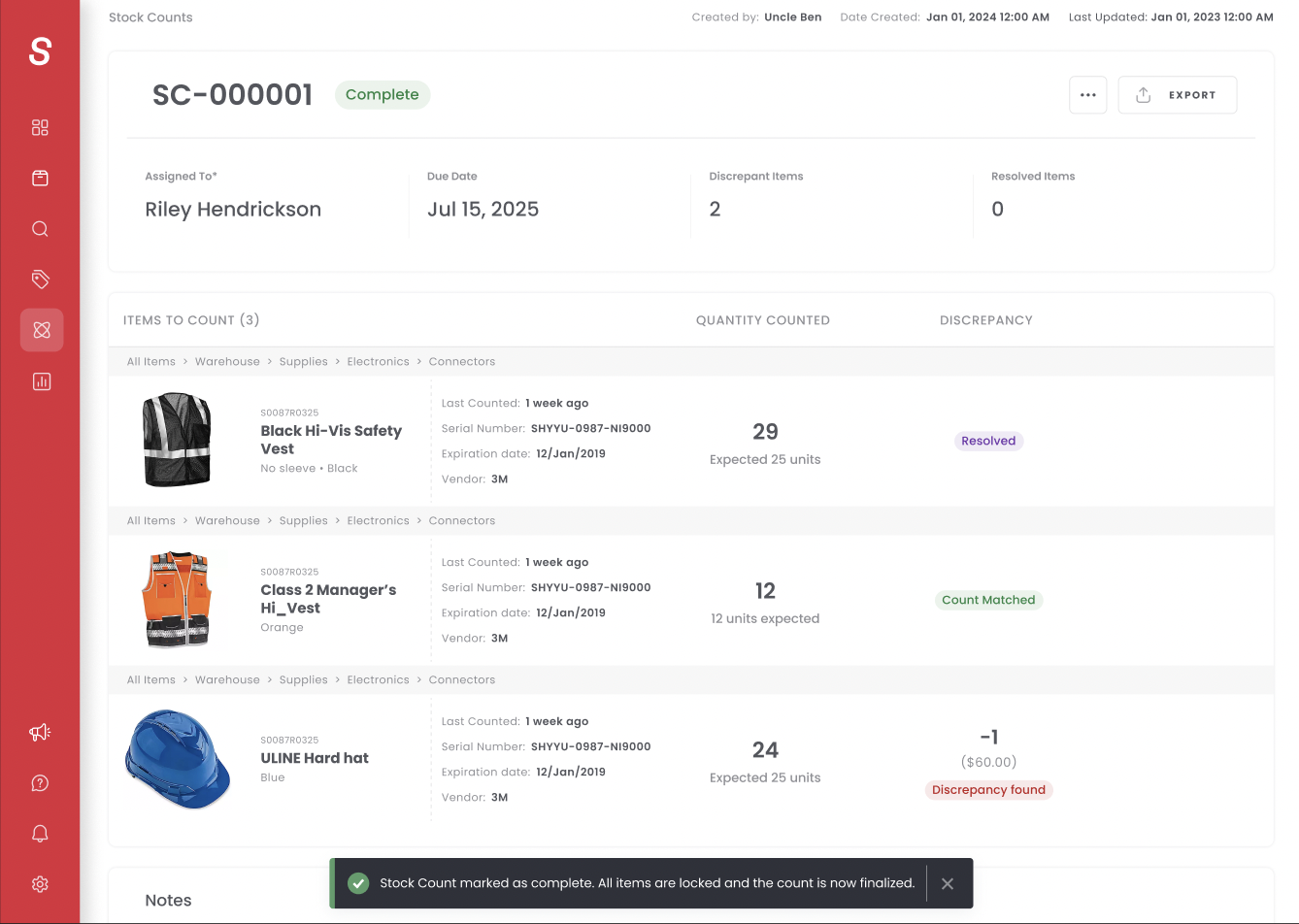
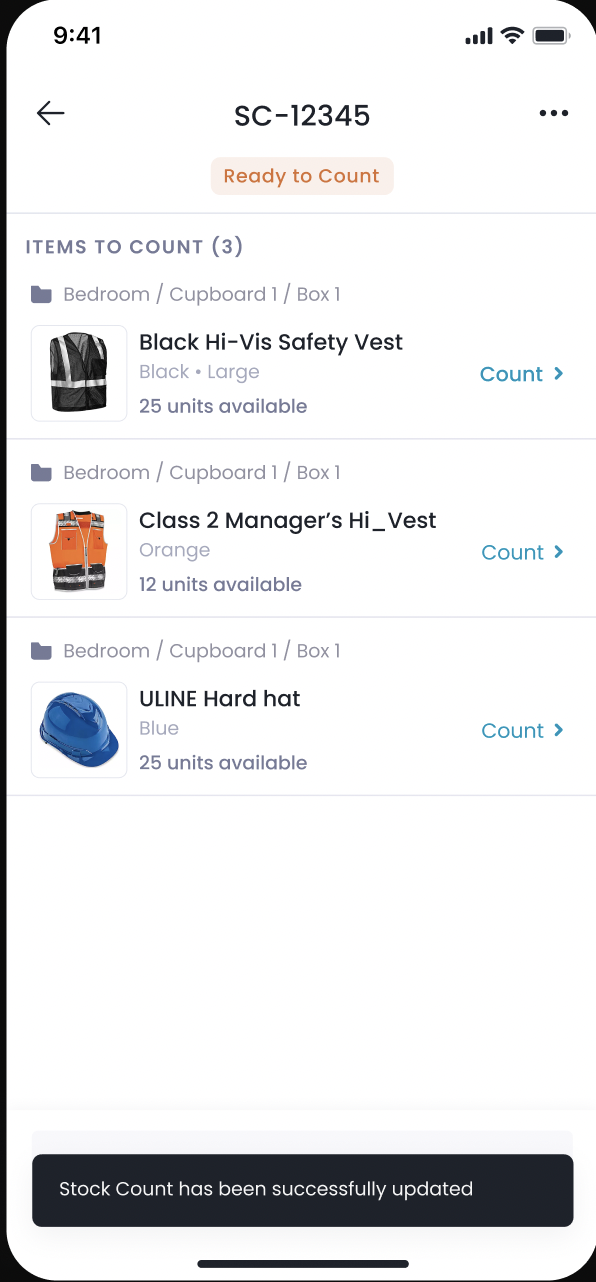
Blind Counts. If a counter can see the expected number, the count is compromised. They might match it consciously or unconsciously, defeating the entire purpose. We introduced a blind count toggle: expected quantities are visible during setup, then hidden the moment counting begins. Independent counts, no bias, accurate audits.
Permissioning. Not every role should approve inventory changes. Based on discovery, we restricted review and approval to Owner and Admin roles only. Team Members and Custom Roles can create and count, but cannot approve quantity changes. Businesses get the control they need to ensure adjustments are authorized by the right people.
250-Item Limit. A Pick List takes an hour. A Stock Count can take weeks. We increased the limit from 100 to 250 line items so users could build comprehensive counts without creating a dozen separate stock counts to cover the same inventory.
UI/UX. Every action is one tap or one click. Scan a barcode, quantity goes up. Submit for review, one button. We shipped a clone feature so users can duplicate previous counts instead of rebuilding from scratch, and PDF export so warehouse teams can print the list and take it to the floor. Item search is powered by the Enhanced Search component, which drove a 166% lift in items added to Stock Count workflows.
Cross-Platform Sync. The hardest problem: two people, one stock count, conflicting data. A counter working offline on mobile while someone edits the same items in real-time on web. We solved it with a sync indicator: when conflicting data is detected, the mobile user gets a prompt to re-sync and pull the latest version before continuing. Web takes precedence. Clean, transparent, no silent data overwrites.
Results
Stock Counts is available exclusively to customers on Ultra plans and higher. Every metric below represents engaged, paying customers on our highest-tier plans.
The headline: 81.5% of users who ran a stock count found discrepancies in their inventory. Four out of five businesses discovered their Sortly data didn't match what was actually on the shelf. That's the entire business case validated in a single number. Sortly wasn't the source of truth, and Stock Counts gave customers the tool to make it one.
4,150+ stock counts created since launch, with consistent weekly usage proving this isn't a novelty. Customers are building Stock Counts into their recurring operations. Repeat usage through our clone feature confirms businesses are embedding this into their standard inventory processes, not just trying it once.
Cross-platform validated. Launching simultaneously on web and mobile was the right call. Web leads creation at 58%, but mobile accounts for 42% of stock counts started, with strong adoption of scan-to-count mode. The hypothesis held: teams create on web, count on mobile.
The funnel tells the story. Over 60% of companies who viewed Stock Counts started one. For a feature gated to higher-tier plans that involves multi-step, multi-day workflows with permissioned review, that activation rate reflects strong product-market fit. Companies aren't just exploring. They're committing to the full workflow.
Discrepancy resolution is the core value. Of users who found discrepancies, over 40% updated their quantities directly in Sortly, immediately improving inventory accuracy. Another 37% resolved discrepancies through the formal review flow. The feature is doing exactly what it was designed to do: surface inaccuracies and give businesses a clear path to fix them.
Permissioning matches reality. Owners drive the majority of stock count activity, with Admins handling a significant share of completions. The role-based review flow we designed based on discovery maps exactly to how businesses are using the feature in production.
Stock Counts has become a key differentiator in the upgrade path, driving measurable interest from lower-tier customers exploring what Ultra unlocks. The feature isn't just serving existing customers. It's pulling new ones up the pricing ladder.
A new PLG upsell lever. We built a Stock Counts CTA for users on lower-tier plans, surfacing the feature in-product and inviting them to explore what the Ultra plan unlocks. 12.7% of eligible users engaged with the CTA, converting the feature into a direct monetization path and opening a new upsell motion the business can now reuse for future gated capabilities.
Key Learnings
Bring engineering in early. Earlier than you think. Even during discovery, before solutioning begins, having engineering at the table changes everything. They think about edge cases you won't catch. They flag sync complexity, permissioning challenges, and cross-platform pitfalls before they become blockers. For Stock Counts, getting front-end, back-end, and mobile aligned from discovery meant we entered development with shared context, not surprises. Engineering buy-in before solutioning leads to better architecture and fewer pivots mid-build.
Betas are discovery tools, not just product launches. The Cycle Counts beta gave us more than early feedback. It helped us identify power users we wanted to interview, customers who were excited about the direction, and users who didn't engage at all. It let us flex our experimentation muscle, ship a basic MVP, collect real signal, and then go build the full product with confidence. The beta didn't just validate demand. It shaped the roadmap.
Aligning a cross-functional engineering team is a leadership exercise. Front-end, back-end, and mobile all need to be in lockstep when you're building a cross-platform feature. The back-end touches both front-end and mobile. The designs differ across platforms, but the logic can't. Leading those discussions, creating open dialogue, thinking through sync edge cases together, that alignment is what turns a complex build into a successful launch and strong KPIs.
Discovery told us what to build. We listened. A lot of what customers asked for during discovery is exactly what we shipped. The direction customers pointed us in shaped the product directly. There were nuances we introduced that surprised and delighted users, but the core of Stock Counts was built on what customers told us they needed. The adoption numbers confirm we got it right.
Steal the foundation. Build the rest from scratch. For Stock Counts, approximately 60-70% of the workflow framework already existed from Pick Lists and other workflows. We took that foundation and put our spin on it: the 250-item limit, blind counts, permissioned review, cross-platform sync. That's how you ship fast without starting from zero.