MileGuard: Lease Mileage Tracker
Built and shipped a native iOS app that helps lease drivers track mileage, avoid overage penalties, and manage vehicle maintenance. From idea to App Store in 4 weeks.
The Problem
Leasing a car comes with a hidden trap. You sign the papers, note your starting mileage, and then forget about it. The monthly mileage allowance and per-mile overage penalties are buried in lease documents that most drivers skim once and never revisit.
This is by design. Manufacturers benefit when drivers don't track their mileage. Overage fees at turn-in can run into thousands of dollars, and most people don't realize they're over until it's too late.
I'd always wanted to build something in the automotive space. Through research with Grok and Claude, I mapped the landscape and found a gap I was shocked no one had filled: no product helped lease drivers proactively track their mileage budget. There were apps for gas tracking, maintenance reminders, and trip logging, but nothing purpose-built to answer the two questions every lease driver should be asking: How many miles can I drive this month? and What will it cost me if I go over?
My Approach
Market Research & Validation. I started by mapping the landscape, diving into X, Reddit, and the App Store to understand what existed and where the gaps were. What I found was fascinating: consumer leases only account for 20-25% of the total lease market. The bigger market is commercial fleet management, and it's well-served by apps focused on mileage logging for taxes and employer tracking. That wasn't my target. I was going after the opposite end of the market: everyday consumers who lease a personal vehicle and have no tool to manage their mileage budget.
I validated through App Store Optimization tools, searching for what real users were looking for. And then validation landed in my own driveway. My wife picked up a new Tesla on a lease, and even Tesla didn't tell her how many miles she could drive per month. She was tracking mileage manually in the Notes app. I thought: there has to be a better way.
Technical Discovery. Smartcar emerged early in my research as the key integration. Their SDK already connected with 40+ common US vehicle brands, offering real-time odometer data without a physical dongle. This was critical: the app would only succeed if syncing felt seamless. But I also knew 40 brands didn't cover everyone, so I designed a manual tracking path from day one.
For lease document scanning, I landed on OpenAI's Image API. Finding mileage allowances buried in lease paperwork isn't straightforward, but image recognition could pull the key details automatically. Cost-effective to build, zero hassle for the user.
Build & Scope Discipline. I used AI tools heavily throughout. Claude for deep research, constantly building markdown files and refining questions until I had a solid PRD. I chose native iOS with SwiftUI since the US was my target market and iOS is the dominant platform here. I considered the global market but scoped the MVP to the US to avoid overreach.
Scope creep was a constant temptation. I wanted smart push notifications (warnings at 75%, 90%, and 95% of monthly mileage allowance) and maintenance tracking (oil changes, tire rotations, air filters) in v1, but I trimmed both to keep the launch focused. When the scope is too big, trim it. This mirrored exactly how I work at Sortly. I shipped the core experience first and rolled out notifications and maintenance tracking in a fast-follow update.
I spent significant time on onboarding and design, reading articles, studying user flows, and learning UI/UX patterns. As someone who isn't a designer by trade, this was one of the most valuable parts of the process.
From idea to App Store in roughly 4 weeks.
The Solution
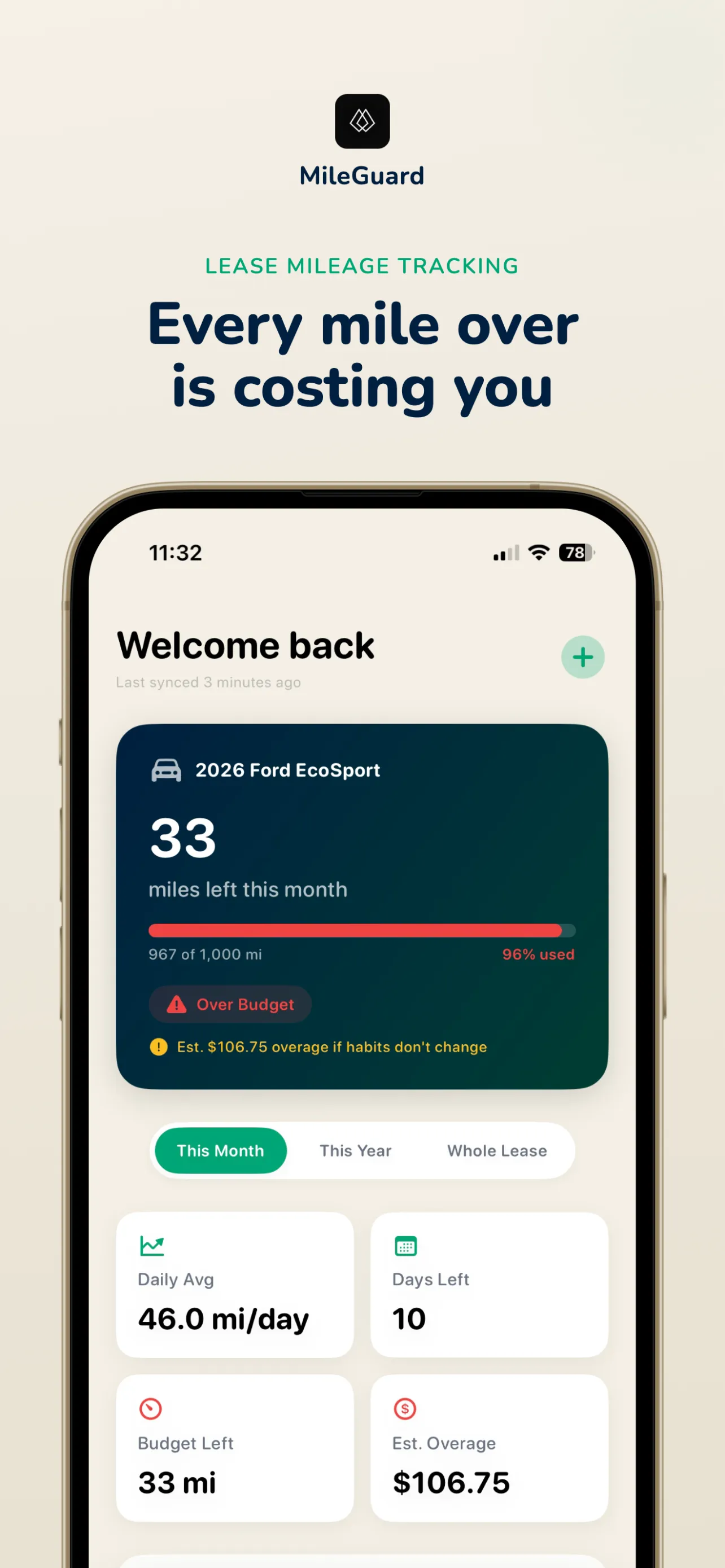
MileGuard is a native iOS app that gives lease drivers complete visibility into their mileage budget, overage risk, and vehicle maintenance, all in one place.
Automatic Mileage Tracking. The core experience is powered by the Smartcar SDK. Over 40 major auto manufacturers offer connected accounts when you lease a new vehicle. Users sign into their manufacturer account through Smartcar, and MileGuard begins syncing odometer readings automatically. Every time you drive, the app updates your trajectory, pacing, and projections against your lease terms. For connected users, it's set-it-and-forget-it.
Manual Tracking. Not every vehicle supports Smartcar. For those users, a simple "+" button lets them log mileage manually with optional notes like "Trip to San Francisco." Every entry is logged in a dedicated mileage section for easy visibility, and entries can be updated on the fly if a mistake is made. It requires more persistence than the automatic route, but users can log on their own schedule.
Lease Document Scanning. Instead of making users dig through pages of lease paperwork, the OpenAI Image API extracts the details that matter: make, model, year, gas or electric, starting miles, and overage amounts. Point your camera at the lease, and the app pulls the key terms directly into your profile.
Smart Push Notifications. Personalized notifications alert users when they're approaching their monthly mileage limit, when maintenance is due, and with a weekly summary of their lease health, similar to Screen Time notifications on Sunday. Research shows personalized push notifications can boost engagement by up to 400%, and for MileGuard, these alerts are the difference between a user who checks in daily and one who forgets until turn-in.
Maintenance Tracking. Oil changes, tire rotations, and air filters are all tracked in one place. This matters for lease drivers specifically because missed maintenance can result in hefty charges at turn-in, a cost most people don't think about until it's too late.
Gamification & Streaks. MileGuard uses streak mechanics to keep users engaged and on track. When you stay at or below your mileage limit for the month, your streak grows. This creates a positive feedback loop: users come back to the app regularly to keep their streak alive, which is exactly the behavior that prevents overage surprises at turn-in. It turns mileage management from a chore into a challenge.
Onboarding. This is where I invested the most time. The app has 8 onboarding screens that walk users through real examples of mileage overages, calculators showing what they might pay at lease end, and step-by-step setup of their lease details. Great onboarding can make or break an app. The goal was to help users feel the need for MileGuard before they even finish setup, turning a download into a daily habit.
Deep Insights. Charts and visualizations help users understand where they stand for the current month, the year, and the full remainder of their lease, giving them the confidence to make smarter decisions about every trip.
Results
MileGuard launched March 20, 2026. Zero paid marketing. Zero social presence. 50+ downloads in week one, all organic. Every download came from friends, family, and word of mouth. The formal go-to-market push is being held until the app is fully polished, a deliberate choice to prioritize product quality over premature distribution.
Accepted into the Apple Small Business Program, reducing App Store commission and validating MileGuard as a legitimate business in Apple's ecosystem.
4 updates shipped in the first week post-launch, focused on UI/UX polish, bug fixes, and deeper data insights. The pace of iteration reflects the same ship-fast-and-learn philosophy I apply at Sortly. Multiple additional updates are planned over the coming weeks as the product matures toward a full public launch.
Distribution is the next frontier. This is new territory for me as a builder, and I'm diving in headfirst with research into ASO, social channels, and content marketing. The product is nearly ready for the spotlight.
This case study is a living document. Results will be updated as MileGuard grows.
Key Learnings
Going solo is just you and your idea. No team, no designer, no engineer. That sounds scary, but it's not. You validate with the incredible tools at your disposal, you push forward, and you accept that you might fail. The important thing is that you go for it, because you never know what could happen.
AI is a game-changer for PMs who build. The ability to describe what you want and have AI help you code it removes one of the biggest barriers to shipping. It's not frictionless. You'll hit bumps and hurdles. But with the right prompts, persistence, and a willingness to put your head down, you can take yourself incredibly far. AI is becoming the PM's best friend, and leveraging it will help you move faster, make a bigger impact, and exceed your KPIs.
Apple's review process is a patience game. Unlike a traditional QA cycle where you find all the bugs at once, Apple rejects your app at the first issue they find. You fix, resubmit, get rejected for the next thing, and repeat. It taught me exactly what Apple needs from me, and that knowledge will pay dividends as I launch additional apps.
Building my own product made me a better PM at work. MileGuard pushed me to go deeper on the "why" before building: understanding TAM, identifying who we're building for, and validating the desire for a feature before moving into PRD stage. It also taught me to come to the table with artifacts and wireframes before projects hit the design stage, giving the team a visual starting point for what we've been hearing from users. This directly contributed to moving more features across the line than any other team at Sortly.
I gained a deep respect for designers. Good UI/UX is the key to a successful app. Thinking about design with clarity and intention makes a huge difference, and doing it yourself gives you an appreciation for the craft that you can't get from the PM side of the table alone.
My advice to PMs thinking about building on the side: go for it. Always be learning. Always be pushing what you know. Prompting is key.
Try MileGuard
Available now on the App Store. Visit the website to learn more.